
Claude Code on Android, Running on Your Mac
Written by the people who make Peering. Checked against the app's own code, November 2026.
Why run the agent on the Mac and not on the phone
Claude Code, Codex and OpenCode need a real machine: the checkout, the build tools, the test suite, your git credentials. Running one in a phone terminal app means copying all of that somewhere else. Peering leaves the work where it already is and makes the phone a remote for it. When you close the phone, the agent carries on.
What you can do from the phone
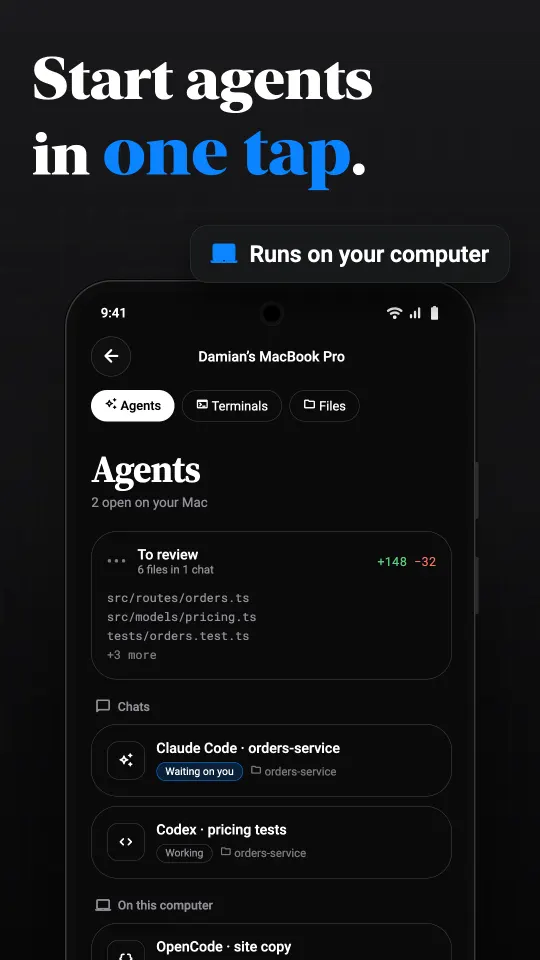
- Start an agent in one tap in any folder on the Mac. Claude Code, Codex and OpenCode are supported.
- Follow it as a chat, not a scrolling terminal: messages, tool calls, sub-agents and the files it touched, with tabs when several chats run at once.
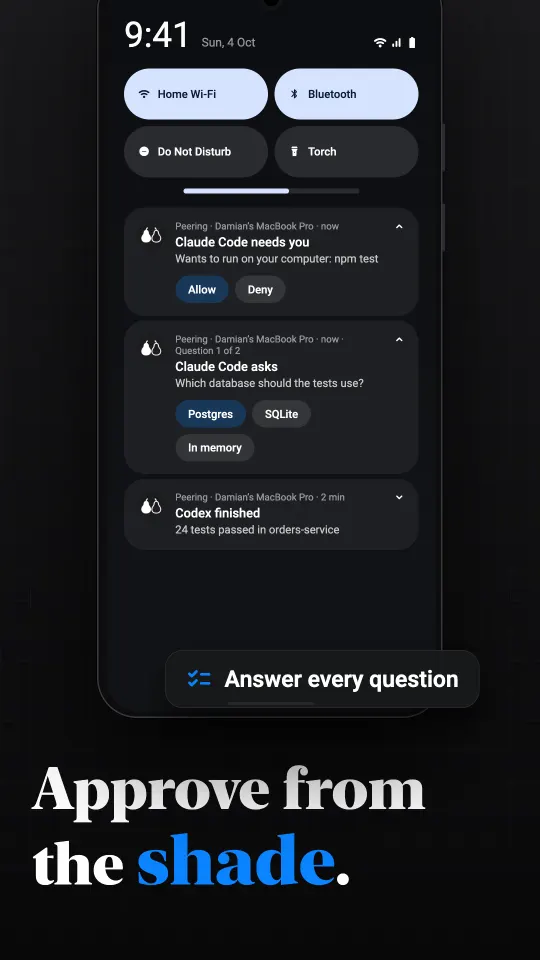
- Answer its questions. When an agent asks something with several choices, tap one. Questions with several parts are answered one at a time.
- Allow or Deny a command from the notification, without opening the app.
- Review the changes: a To review inbox gathers chats with finished work, and each shows the diff by file. Follow-up buttons appear after a turn that changed files.
- Type with hints: slash commands and at-mentions of files are suggested as you type, and you can dictate a prompt instead.
- Drop to the terminal or the screen when the chat is not enough. The agent's shell, a plain terminal and the Mac's whole desktop are all in the same app.
Approvals from the notification shade
When Claude Code wants to run something you have not allowed, it stops and waits. On Android, Peering posts a notification naming the agent and the command, with Allow and Deny buttons. Answer it from the shade or the lock screen. The same happens when an agent finishes a turn, or when a terminal on the Mac is waiting for a password.
To be exact about when this works: Android notifications arrive while Peering holds a session open in the background. An ongoing notification names the Mac and has a Disconnect button, and the Mac pauses the picture so nothing is streamed that you cannot see. You can turn that off in Settings. If Android itself stops the app, for example under aggressive battery limits, the alerts stop until you open it again. The iPhone app also receives them with the app closed; see notifications for coding agents.
Setting it up
Install Peering for Mac and the agent you use, as you normally would. Install Peering on the phone from Google Play when it is listed, pair once with the six-digit code, and open the Agents tab. Peering finds the agents installed on the Mac; it does not ship or pay for one, and it never sees your API keys or subscription.
Safe enough to leave running
Everything between the phone and the Mac is end-to-end encrypted, including the chat and the approvals. The relay that carries it when you are away cannot read it. The Android app can be locked behind your fingerprint or face, so a borrowed phone cannot approve a command.
What it costs
The agents, the terminal and the alerts are on every plan. Free on your own network with no time limit, plus 30 minutes a day of relay time for reaching the computer from another network. Pro ($2.99 a month) or Lifetime ($24.99 once) removes the daily limit. Those are the US prices; Google Play shows yours in local currency.
Questions
Can I use Claude Code on Android?
Claude Code runs on a computer, not a phone. With Peering it keeps running on your Mac, and the Android app shows its chat, lets you start new ones, answer its questions and approve commands.
Does it work with Codex and OpenCode too?
Yes. Peering's agent view supports Claude Code, Codex and OpenCode installed on the Mac.
Can I approve a command without opening the app?
Yes. The notification has Allow and Deny buttons. On Android it arrives while Peering keeps a session open in the background.
Does Peering see my code or API keys?
No. The agent runs on your Mac with your own credentials, and the connection between the phone and the Mac is end-to-end encrypted.
Is there a Windows version?
The Windows host is in early beta. It has Claude Code chat but not yet change review, commit or push, and it has not been run on a real PC.